Projects, scenes, shoots and takes#
Build the storyboard#
- Project: one film or one sequence. Holds scenes and project-wide settings.
- Scene: shoots that share a setting. A scene carries the default LoRA list its shoots inherit and, once built, a character set.
- Shoot: one shot. It has a prompt, a preset, a reference image and optional voice references. Clone a shoot (shoot menu → Clone (without takes)) to keep its settings and change only the prompt. With a text-only capable preset (MiniMax H3 (Hailuo 3.0) or a character set built on that base) the start frame is optional: leave it empty and the shoot renders from the prompt alone.
- Take: one rendered attempt of a shoot. A shoot keeps all its takes; mark the one you want as the selected take.

Generate one shoot#
Click Generate on the shoot. A take is created in the pending state and queued; the card shows the runtime's progress and switches to a player when the take is complete. Take status is set by the backend when the render finishes, so closing the browser does not lose a take. Unsaved changes in the shoot panel are saved first, so every take records exactly the settings it was rendered with (see Take info).
Steps may stay empty: the runtime then uses the preset's own step count, shown as the field's placeholder (MiniMax H3 runs 10, LTX distilled 8). A number you type is sent to the runtime as-is and the shoot card shows it. The scene settings carry the same field as the default for new shoots. CFG works the same way for models that run classifier-free guidance (LTX); MiniMax H3 is guidance-distilled and ignores it, so the shoot panel shows a note instead of the field there.
Seed may stay empty as well: the first take then uses the scene's default seed if one is set, else a random seed. A number you type is used by the first take (a screenplay import fills it from its seed plan the same way), and every take card shows the seed it was rendered with. Re-takes ask for a seed in the confirmation dialog, where the earlier takes' seeds are listed.
Generate all shoots#
Generate all shoots in the scene settings renders the shoots of the scene in order as a chain (Generate whole project does the same for every scene):
- Only the first shoot is queued. When it completes, its last frame becomes the reference image of the next shoot, which is queued automatically.
- The chain runs entirely in the backend. You can close the studio and come back; the scene shows which shoot is rendering.
- A failed shoot stops the chain. Fix the prompt or reference and resume from that shoot.
- Reference-to-video shoots (MiniMax H3 with reference images, character sets) do not use the handed-over frame unless Continue from the previous shoot's last frame is ticked on them: their look comes from the references and the scene constants, so the cut is a real cut. See Continuity and chaining.
- The handover crosses scene boundaries: the first shoot of a scene continues from the last shoot of the previous scene (its selected take, else its latest completed one), so a scene-level chain picks up where the previous scene ended.
- When every shoot already has a completed take, nothing is queued and Maystro asks whether to generate all of them again; the existing takes are kept.
- The first shoot may itself be a reference shoot, or a text-to-video shoot on a model that renders without a start frame; it then needs no reference image.
Chaining keeps continuity between image-to-video shots (same lighting and framing at the cut). For a hard cut with a new framing, give the next shoot its own reference image instead.
Re-takes#
Identity and motion vary between takes with the same prompt. When a take is close but not right, keep the prompt and generate again: a new seed is the cheapest fix. Change the prompt only when every take shows the same problem.
Take info#
Click a finished take to open it in the player. The take info sits beside the video (the i button in the header hides it); Info in the take's right-click menu opens it for any take, a failed one included, which then shows its error instead of a player.
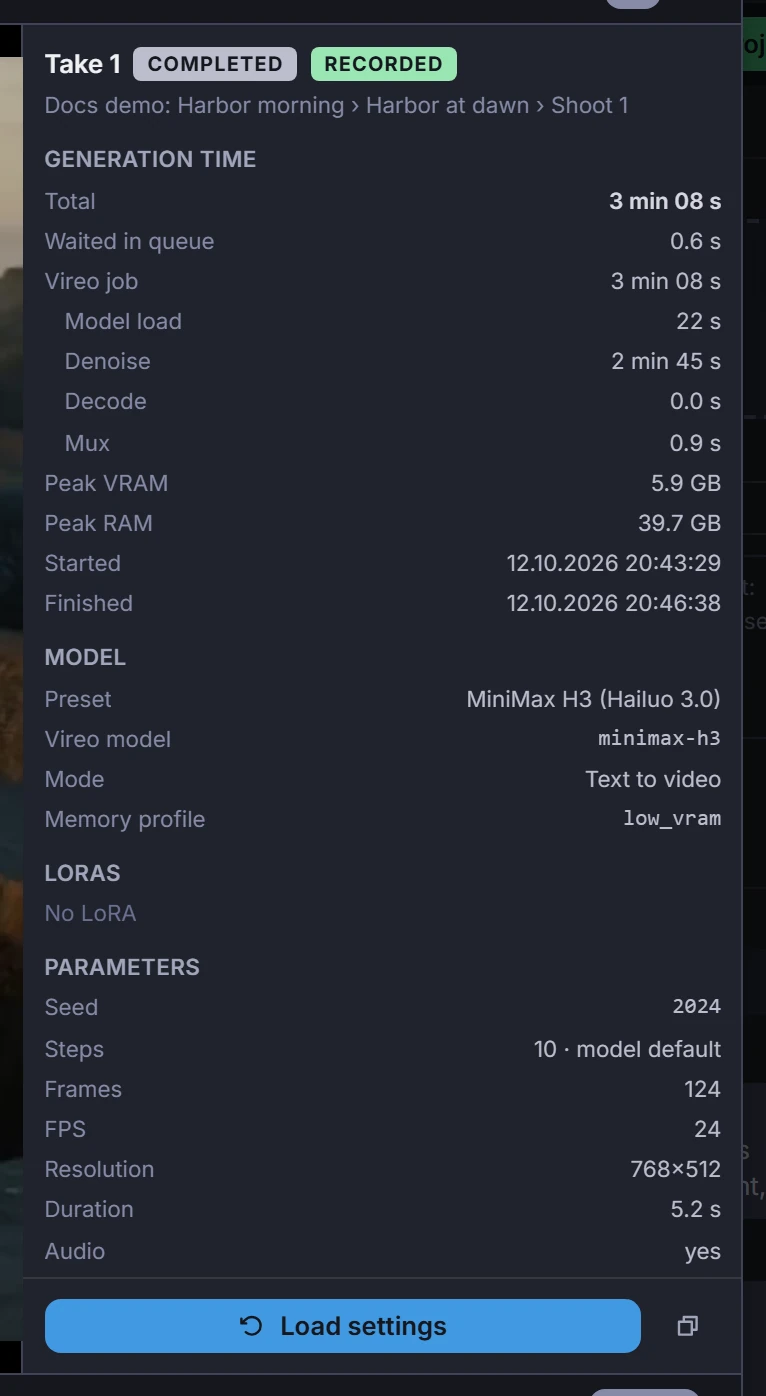
- Generation time: the total from queue start to the saved video, the time the take waited in the queue, and the runtime's own phases — model load, denoise, decode, mux — with the peak graphics and system memory.
- Model: the preset, the runtime model, the mode (text, image or references to video), the memory profile and the files a custom preset puts into its slots.
- LoRAs with the weight each ran at. A character set carries its LoRAs fused; the panel then says the shoot's own LoRA list was ignored.
- Parameters: seed, steps, CFG, frames, frame rate, resolution, length, clips, attention kernel, sampler, noise source, schedule shifts, reference canvas, audio.
- Prompt exactly as the runtime received it, scene constants and negative contract included, then the start frame or the reference images and voice references.
Copy as JSON copies all of it. Takes rendered before this panel existed show what could be rebuilt from the queue history; the badge next to the take number says whether the values were Recorded or rebuilt, and a take whose queue history is gone knows only its seed, preset and start frame.
Load a take's settings#
Load settings (take menu, or the button in the take info) puts a take's settings back into the shoot panel: prompt, negative prompt, chain clips, scene constants and negative contract, frames, steps, CFG, seed, preset, start frame or reference images and voice references, LoRAs and their weights, attention kernel. Change only what you want to compare — another reference, another LoRA weight — and click Generate: the confirmation dialog preselects the loaded take's seed, so the two takes differ only in what you changed.
Nothing is saved until you generate or save. The notice after loading lists what could not be restored (an older take), a preset that no longer exists and a scene resolution or frame rate that changed since the take was rendered — those are scene settings, so loading a take does not change them.
Loading sets the shoot's prompt templates at once, the way their own picker does.
Clone a scene or a shoot#
Clone (without takes) in a scene's menu copies the scene right after itself: its defaults and default LoRAs, and every shoot with all its settings — prompt, references, LoRAs, prompt templates, chain clips. The renders stay behind: the copy has no takes and no selected take. The same item on a shoot card copies one shoot right after itself in the same scene. Use a copy to try a variation without touching the original or its takes.
Join takes into one video#
Every shoot keeps its takes; the film is the selected take of each shoot. Two buttons join those takes with ffmpeg:
- Join selected takes in the scene settings joins the selected takes of one scene in shoot order.
- Merge project in the project header joins every scene in order, each scene's selected takes in shoot order. The transition between the takes of a scene and the transition between scenes are chosen separately: a cut, a crossfade or a fade to black, with the transition length in seconds.
The project merge opens with its plan before anything renders: which shoot enters with which take, which shoots are skipped because they have no selected take (or the selected take's file is gone), how many scenes enter and the estimated length. Check the plan, then click Merge.
Rules the merge follows, shown in the plan:
- The first take that enters defines the output size and frame rate. Takes in another size are scaled to fit and letterboxed; takes at another frame rate are re-timed. They are marked scaled in the plan.
- Audio is resampled to 48 kHz stereo (MiniMax H3 renders 32 kHz, LTX 44.1 or 48 kHz). A take without sound gets silence of its own length, so the sound of the others stays in sync.
- A single take is returned as it is, without re-encoding.
The result is saved in the video store and opens in the player; the project header keeps a Merged video button for the last merge. The scene join opens its result the same way.
Metadata in the video files#
Like images, the videos carry what made them, in the same keys:
maystroai_metadata holds the Maystro version, the project, scene, shoot and
take, the preset, the values the render ran with and its timing, and the
shoot settings that "Load settings" uses; maystroai_graph holds the queued
graph. They are MP4 metadata tags (the way ComfyUI stores its prompt and
workflow in videos), written without re-encoding, so the frames are untouched.
Local file paths are reduced to file names. A joined scene or project video
lists the takes it is made of, in order.
Any tool that reads MP4 tags shows them, for example
ffprobe -show_format take.mp4 or exiftool.